🦾 KER Exoskeleton Hardware Overview
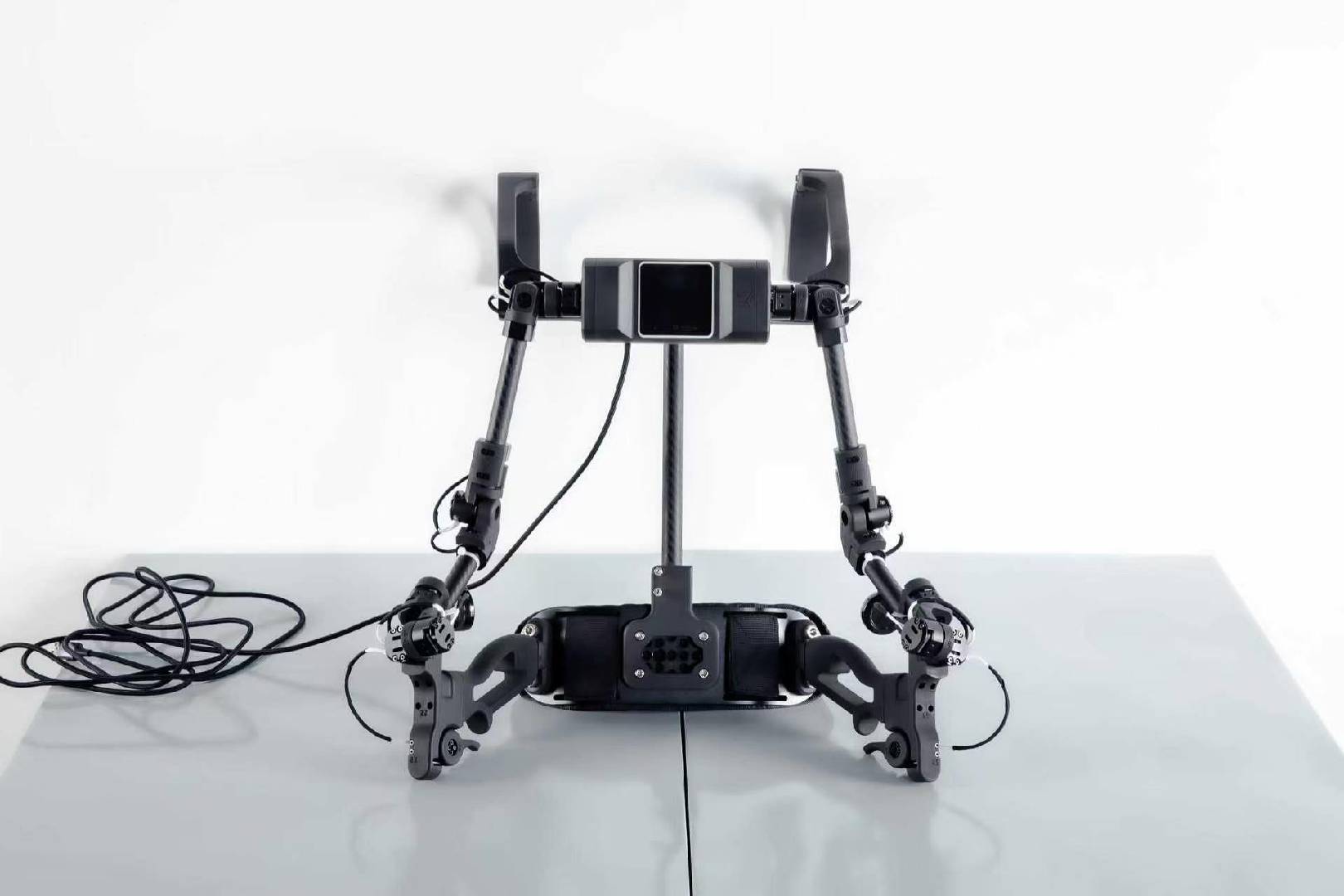
OpenArmX KER is a motorless, fully passive, bimanual teleoperation master device. It converts the operator's arm motion into 16 joint-angle channels and sends them to a robot controller over USB or Wi-Fi for real-time teleoperation and imitation-learning data collection.
🌱 Open-source origin and software development
The KER exoskeleton hardware originates from the open-source KER (Kinematic Equivalent Replica) project created by the OpenArm team. We thank the OpenArm team for sharing its hardware design, kinematic approach, and open-source work with the community, making robot teleoperation and imitation-learning research more accessible.
We have not modified the original KER mechanical structure, electrical design, or encoder solution. The CFRP links, passive joints, 16-channel encoder system, and backpack-style structure described here come from the OpenArm KER hardware design. Our work focuses on software development and tooling:
- Added Wi-Fi connectivity and real-time UDP transport while retaining the original USB wired mode.
- Developed the configurable
openarmx_teleop_kerROS 2 package, which adapts different robots through YAML joint names, indices, units, ranges, and controller endpoints. - Developed KER Manager for Wi-Fi configuration, zero calibration, angle monitoring, debugging, and firmware flashing.
- Continued the OpenArm team's open-source approach: the KER firmware, ROS 2 teleoperation package, and related software are released as open source for learning, reproduction, and further development.
Related open-source projects:
- OpenArm open-source organization and projects
- OpenArmX KER firmware source
- OpenArmX KER ROS 2 teleoperation package
OpenArmX KER software enhancements build on the OpenArm team's open-source work. Follow the licenses in the upstream project and each software repository when using or redistributing these materials.
✨ Main features
- 16 bimanual channels: 7 joint channels and 1 gripper channel per arm.
- 7-DoF kinematic structure: joint structure matches OpenArm 2.0, with links scaled to about 70% for 1:1 motion mapping.
- Motorless passive design: no power output, motor resistance, or cogging torque; suitable for long sessions.
- Modular absolute encoders: 16 Infineon TLE5012B magnetic angle sensors with 15-bit absolute resolution.
- Dual transport: USB Type-C wired transport or Wi-Fi; Wi-Fi uses UDP port
19090by default. - Backpack-style quick wearing: approximately 1.7 kg and can be put on and adjusted in about 30 seconds.
📋 Specifications
| Item | Specification |
|---|---|
| Product type | Motorless passive master / exoskeleton motion-capture device |
| Degrees of freedom | 16 bimanual channels (7 joints + 1 gripper per arm) |
| Structural materials | CFRP tubes, machined aluminum, PA12 nylon parts |
| Sensors | 16 × TLE5012B, 15-bit absolute magnetic encoders |
| Data interfaces | USB Type-C; Wi-Fi UDP |
| Wi-Fi port | 19090 |
| Robot compatibility | OpenArm 1.0, OpenArm 2.0, OpenArmX; other robots through YAML configuration |
🎛️ Channels and pose data
KER packets provide 16 angles in right-arm then left-arm order. The default OpenArmX channel indices are:
| Index | Channel | Index | Channel |
|---|---|---|---|
| 0–7 | right_j1 … right_j7, right_trigger |
8–15 | left_j1 … left_j7, left_trigger |
The actual angle ranges and signs are defined by the robot configuration. Do not infer directions from appearance alone; verify each joint in simulation after the first connection.
🔗 Data transport
USB mode uses the KER USB Vendor interface. The ROS 2 node performs the protocol handshake, reads the device schema, and continuously receives the latest pose. Wi-Fi mode uses UDP: the node sends heartbeats to maintain the session and keeps only the newest packet, so packet loss does not build up stale commands. It automatically re-handshakes after a device restart or network recovery.
The host computer's USB CDC serial interface is used for configuration, calibration, and debugging. It is separate from the teleoperation data interface. Do not allow two programs to claim the same KER USB data interface.
🛡️ Wearing and safety checks
- Stop robot motion or enable simulation, then place the KER in its natural neutral pose.
- Adjust shoulder straps, waist belt, and joint limits for comfort without interference.
- Confirm that every joint moves smoothly without collision, cable tension, or abnormal friction.
- Keep the emergency stop and a safety operator available for real-robot use; start with small, slow motions.
- If you see a wrong direction, pose jump, or connection loss, release control immediately and check calibration, mapping, and limits.