VR Data Collection (Pico)
This page corresponds to the LeRobot data collection workflow for OpenArmX + Pico4 Ultra.
🧩 Hardware Checklist
| Device | Quantity | Description |
|---|---|---|
| OpenArmX bimanual robot | 1 unit | Follower side, executes teleoperation commands |
| RealSense D405 | 2 units | Left/right wrist cameras |
| RealSense D435 | 1 unit | Head camera |
| Pico4 Ultra | 1 unit | VR teleoperation device |
| USB 3.0 high-speed hub (>=3 ports) | 1 unit | Ensures camera bandwidth |
| Gigabit router + gigabit Ethernet cable | 1 each | Dual-host communication |
| Collection host (industrial PC) | 1 unit | Robot + camera side |
If you use a local server for training, you can also receive data directly on that server. You only need both hosts to be on the same Wi-Fi network.
⚠️ Safety Checks Before Collection
- Before starting the bimanual robot, confirm the CAN board is started (blue light solid on; green light means not started)
- Blue light blinking on the CAN board after startup is normal
- Gently move the robot arm and confirm each joint has resistance (motor enable succeeded)
- Keep away from flammable, explosive, and corrosive hazardous materials
- Keep a safe distance from the robot during collection
Collection Side (Industrial PC)
Terminal 1: Start bimanual robot
cd ~/openarmx_ws
source install/setup.bash
ros2 launch openarmx_bringup openarmx.bimanual.launch.py \
  control_mode:=mit \
  robot_controller:=forward_position_controller \
  use_fake_hardware:=false
Terminal 2: Start Pico bridge
cd ~/openarmx_ws
source install/setup.bash
ros2 run openarmx_teleop_bridge_vr openarmx_teleop_bridge_vr_node
Terminal 3: Start IK solver (VR teleoperation)
cd ~/openarmx_ws
source install/setup.bash
ros2 launch openarmx_teleop_vr teleop_vr.launch.py
Terminal 4: Start three cameras
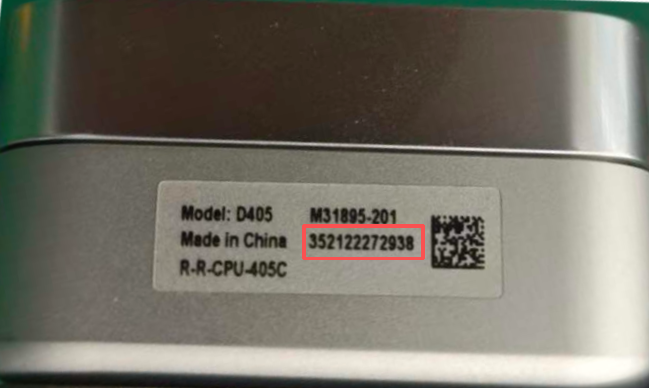
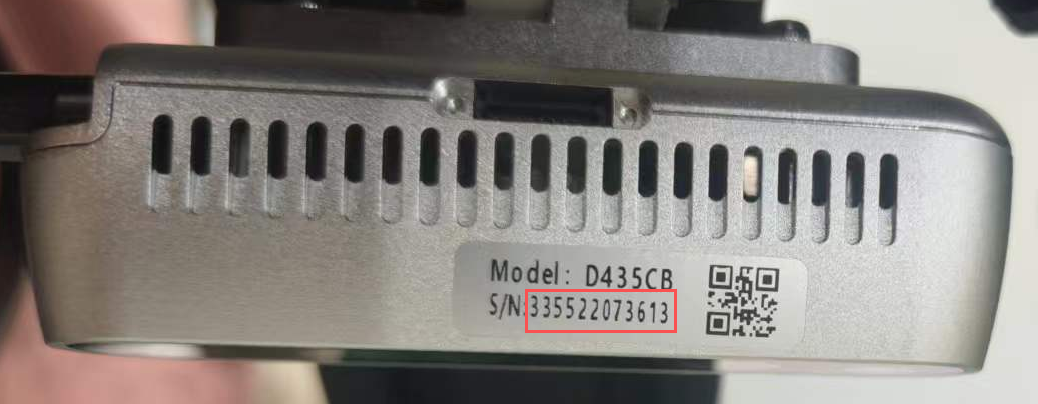
Query camera serial numbers (output is ordered as left, center, right; use the Serial Number field, do not use Asic Serial Number):
| D405 | D435 |
|---|---|
 |
 |
rs-enumerate-devices | grep "Serial Number"
Start cameras:
cd ~/openarmx_ws
source install/setup.bash
W=424; H=240; FPS=30
ros2 launch openarmx_lerobot camera_publisher.launch.py \
  width:=$W height:=$H fps:=$FPS \
  cam_left_serial:=左手序列号 cam_left_type:=D405 \
  cam_right_serial:=右手序列号 cam_right_type:=D405 \
  cam_head_serial:=头部序列号 cam_head_type:=D435
width/height/fpsmust be exactly consistent across collection, training, and inference.
Terminal 5: Start LeRobot collection
Enter the LeRobot environment first, then run the recording command:
W/H/FPSconfigures camera resolution and frame rate during collection (for example,W=640; H=480; FPS=30).W/H/FPShere must be exactly the same aswidth/height/fpsincamera_publisher.launch.py.- After changing W/H/FPS in the camera publisher node, also change W/H/FPS in the data collection command to match; otherwise, camera format mismatch will cause errors.
🚨 Key constraint:
collection W/H/FPS=camera publish width/height/fps. Default save path:~/.cache/huggingface/lerobot/localIf batch collection fails, delete the folder with the same name under
localand rerun collection. If you do not delete it, an error will occur and collection will fail.
General template:
lerobot-env
W=424; H=240; FPS=15
HF_HUB_OFFLINE=1 lerobot-record \
  --robot.type=openarmx_follower_ros2 \
  --robot.cameras="{cam_left: {type: ros2, image_topic: /cam_left/color/image, depth_topic: /cam_left/depth/image, use_depth: true, width: $W, height: $H, fps: $FPS}, cam_right: {type: ros2, image_topic: /cam_right/color/image, depth_topic: /cam_right/depth/image, use_depth: true, width: $W, height: $H, fps: $FPS}, cam_head: {type: ros2, image_topic: /cam_head/color/image, depth_topic: /cam_head/depth/image, use_depth: true, width: $W, height: $H, fps: $FPS}}" \
  --teleop.type=openarmx_leader_ros2 \
  --dataset.repo_id=local/你的数据名称 \
  --dataset.single_task="你执行的任务名称" \
  --dataset.num_episodes=采集的总组数 \
  --dataset.episode_time_s=每组时长秒数 \
  --dataset.reset_time_s=组间重置时长秒数 \
  --dataset.push_to_hub=false \
  --display_data=true
Example:
lerobot-env
W=424; H=240; FPS=15
HF_HUB_OFFLINE=1 lerobot-record \
  --robot.type=openarmx_follower_ros2 \
  --robot.cameras="{cam_left: {type: ros2, image_topic: /cam_left/color/image, depth_topic: /cam_left/depth/image, use_depth: true, width: $W, height: $H, fps: $FPS}, cam_right: {type: ros2, image_topic: /cam_right/color/image, depth_topic: /cam_right/depth/image, use_depth: true, width: $W, height: $H, fps: $FPS}, cam_head: {type: ros2, image_topic: /cam_head/color/image, depth_topic: /cam_head/depth/image, use_depth: true, width: $W, height: $H, fps: $FPS}}" \
  --teleop.type=openarmx_leader_ros2 \
  --dataset.repo_id=local/openarmx_dataset \
  --dataset.single_task="Teleop OpenArmX robot" \
  --dataset.num_episodes=100 \
  --dataset.episode_time_s=60 \
  --dataset.reset_time_s=5 \
  --dataset.push_to_hub=false \
  --display_data=true
It is recommended to first collect 10-20 episodes to validate the pipeline, then perform batch collection.
For better results, no fewer than 50 episodes are recommended.
Default save path:~/.cache/huggingface/lerobot/local
⌨️ Collection Shortcuts
| Key | Action |
|---|---|
→ Right Arrow |
End and save current episode, then enter reset stage |
← Left Arrow |
Discard current episode and re-record |
Esc |
Stop recording and exit |
Note: The example shows a 60-second single-episode duration. If you complete the task within 60 seconds, press → Right Arrow to save data; if you do not press it, data is auto-saved after 60 seconds. If collection is wrong, you can press ← Left Arrow to discard the current wrong data, but you must discard before 60 seconds; otherwise, wrong data will be auto-saved. Also, collection cannot be paused during the collection stage. If the dataset is large, alternating operators is recommended.
🔍 Common Parameter Descriptions
| Parameter | Description |
|---|---|
--dataset.repo_id |
Dataset name, e.g. local/openarmx_dataset; must be changed for each new task |
--dataset.single_task |
Task description text |
--dataset.num_episodes |
Total number of episodes |
--dataset.episode_time_s |
Max duration per episode (seconds) |
--dataset.reset_time_s |
Scene reset duration between episodes (seconds) |
--display_data |
Whether to enable Rerun Viewer visualization |
--dataset.root |
Custom dataset save directory (default is HuggingFace cache directory) |
--dataset.vcodec |
Video codec, options: h264, hevc, libsvtav1 |
📷 Camera Parameter Reference
Available Resolution / Frame Rate Combinations
Intel RealSense D405
| Resolution | Supported FPS |
|---|---|
| 1280 × 720 | 5, 15, 30 |
| 848 × 480 | 5, 15, 30, 60, 90 |
| 640 × 480 | 5, 15, 30, 60, 90 |
| 640 × 360 | 5, 15, 30, 60, 90 |
| 480 × 270 | 5, 15, 30, 60, 90 |
| 424 × 240 | 5, 15, 30, 60, 90 |
Intel RealSense D435 / D435i
| Resolution | Supported FPS |
|---|---|
| 1920 × 1080 | 6, 15, 30 |
| 1280 × 720 | 6, 15, 30 |
| 848 × 480 | 6, 15, 30, 60, 90 |
| 640 × 480 | 6, 15, 30, 60, 90 |
| 640 × 360 | 6, 15, 30, 60, 90 |
| 480 × 270 | 6, 15, 30, 60, 90 |
| 424 × 240 | 6, 15, 30, 60, 90 |
With the standard industrial PC + standard expansion hub, the stable upper limit for three cameras is
640×480 @ 30fps. The default recommendation is424×240 @ 15fpsfor lower bandwidth usage and better stability.
Color Parameter Adjustment
You can append the following parameters when launching camera_publisher.launch.py (* replaced with cam_left / cam_right / cam_head):
| Parameter | Description | Range / Values |
|---|---|---|
cam_*_color_auto_exposure |
Auto exposure | true / false / unset |
cam_*_color_exposure |
Manual exposure | 1..10000 |
cam_*_color_gain |
Manual gain | 0..128 |
cam_*_color_auto_white_balance |
Auto white balance | true / false / unset |
cam_*_color_white_balance |
Manual white balance | 2800..6500 |
cam_*_color_brightness |
Brightness | -64..64 |
cam_*_color_contrast |
Contrast | 0..100 |
cam_*_color_saturation |
Saturation | 0..100 |
cam_*_color_sharpness |
Sharpness | 0..100 |
If only
cam_*_color_exposureorcam_*_color_gainis provided, launch will automatically addcam_*_color_auto_exposure:=false; if onlycam_*_color_white_balanceis provided, it will automatically addcam_*_color_auto_white_balance:=false.
- First validate the full pipeline with a small batch (10-20 episodes), then run long-duration collection
- Keep camera exposure and camera placement consistent to reduce training distribution drift
- Create a separate
repo_idfor each task to simplify later training and reproduction - Camera
width/height/fpsmust be consistent in all three places: camera publishing -> collection -> inference