VLA Environment Setup
🎯 Goal: install LeRobot + OpenArmX local environment for data collection, training, and inference.
📝 Conventions
local terminal: ROS2 workspace terminallerobot env terminal: terminal withlerobotconda env activated
Placeholder examples:
your_dataset_name, e.g.openarmx_datasetyour_task_name, e.g.Teleop OpenArmX robotyour_absolute_dataset_pathyour_trained_model_name, e.g.act_openarmx_exp1
1. Install Anaconda and Python Environment
1.1 Install Anaconda
cd ~
wget https://repo.anaconda.com/archive/Anaconda3-2023.03-1-Linux-x86_64.sh
bash Anaconda3-2023.03-1-Linux-x86_64.sh
source ~/.bashrc
1.2 Disable base auto-activation and add shortcuts
conda deactivate
conda config --set auto_activate_base false
conda deactivate

sed -i '/# >>> conda initialize >>>/,/# <<< conda initialize <<</ s/^/#/' ~/.bashrc

echo '' >> ~/.bashrc
echo '# Anaconda shortcuts (manual activation)' >> ~/.bashrc
echo "alias conda-init='source ~/anaconda3/bin/activate'" >> ~/.bashrc
echo "alias lerobot-env='source ~/anaconda3/bin/activate lerobot'" >> ~/.bashrc
source ~/.bashrc
1.3 Create environment
conda-init
conda create -n lerobot python=3.10 -y
conda deactivate
2. Install LeRobot and dependencies
2.1 System dependencies + RealSense
sudo apt update
sudo apt install -y \
  python3-dev build-essential git git-lfs \
  ffmpeg libavcodec-dev libavformat-dev libavutil-dev \
  libjpeg-dev libpng-dev libgl1-mesa-glx libglib2.0-0 \
  libsm6 libxext6 libsndfile1 libsvtav1-dev

sudo mkdir -p /etc/apt/keyrings
curl -sSf https://librealsense.intel.com/Debian/librealsense.pgp | sudo tee /etc/apt/keyrings/librealsense.pgp > /dev/null

echo "deb [signed-by=/etc/apt/keyrings/librealsense.pgp] https://librealsense.intel.com/Debian/apt-repo $(lsb_release -cs) main" | sudo tee /etc/apt/sources.list.d/librealsense.list

sudo apt install -y librealsense2-dkms librealsense2-utils librealsense2-dev
sudo apt install -y ros-humble-realsense2-camera
2.2 Python dependencies
lerobot-env
pip install pyrealsense2 -i https://pypi.tuna.tsinghua.edu.cn/simple/
pip install "scipy>=1.10.1,<1.15" -i https://pypi.tuna.tsinghua.edu.cn/simple/
pip install torch torchvision torchaudio -i https://pypi.tuna.tsinghua.edu.cn/simple/
pip install 'numpy>=1.21,<2.0' -i https://mirrors.aliyun.com/pypi/simple/
pip install 'setuptools>=71.0.0,<80.0.0' -i https://mirrors.aliyun.com/pypi/simple/
pip install pillow imageio matplotlib pyyaml -i https://mirrors.aliyun.com/pypi/simple/
2.3 Install LeRobot (choose one)
A (recommended, pip):
lerobot-env
pip install lerobot -i https://mirrors.aliyun.com/pypi/simple/
B (source editable):
cd ~
git clone https://github.com/huggingface/lerobot.git
lerobot-env
cd ~/lerobot
pip install -e . -i https://pypi.tuna.tsinghua.edu.cn/simple --ignore-installed sympy
C (zip local install):
cd ~
unzip lerobot-0.4.3.zip
lerobot-env
cd ~/lerobot-0.4.3
pip install -e . -i https://pypi.tuna.tsinghua.edu.cn/simple --ignore-installed sympy
Verify:
python -c "import lerobot; print(lerobot.__version__)"
lerobot-info
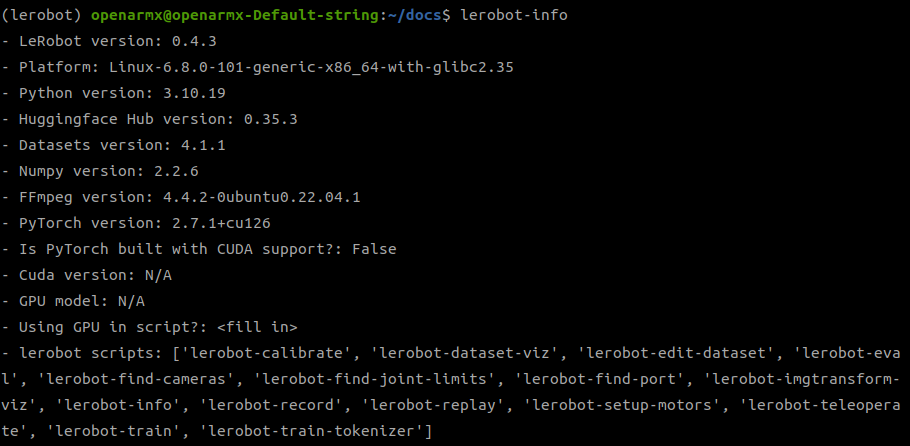
2.4 Install OpenArmX local plugin packages
lerobot-env

cd ~/openarmx_ws/src/lerobot_vla/lerobot_robot_openarmx_follower_ros2/
pip install -e . --no-deps

cd ~/openarmx_ws/src/lerobot_vla/lerobot_teleoperator_openarmx_leader_ros2
pip install -e . --no-deps
3. Version conflict notes
⚠️
Pi0/Pi0.5andSmolVLA/XVLAconflict ontransformers. Use separate conda environments.
- Common LeRobot version:
0.4.3 - XVLA: recommended with LeRobot
0.4.3
✅ Quick Checklist
condadoes not auto-enterbaselerobot-envactivates successfully- RealSense devices are recognized
- Two OpenArmX local plugins are installed
- Planned training model dependencies are consistent